pohunek for Omarchy
Every coding agent on every machine, one keypress away in your Omarchy bar.
Who is working, who is stuck waiting for you, and a real terminal on any of them in one click.
omarchy plugin add https://github.com/pohunekd/omarchy --enable
That is the whole install.
Source on GitHub pohunek.dev v0.3.0
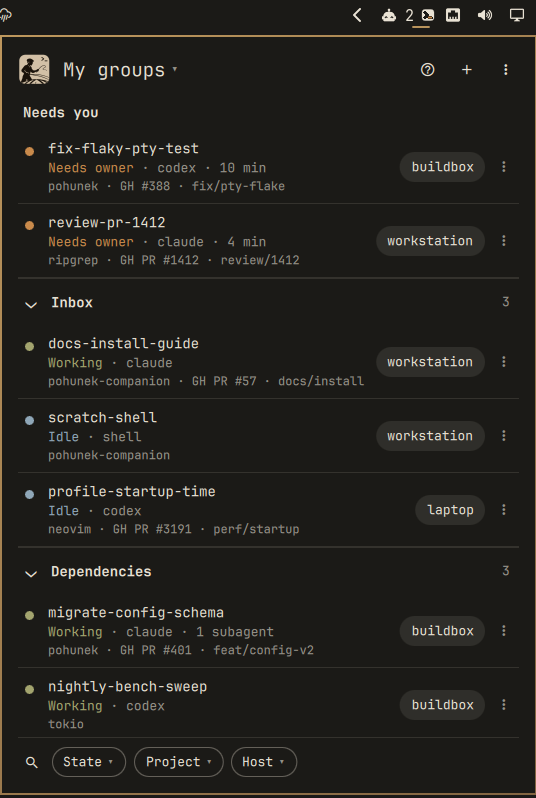
The panel in the bar
The bar icon
The pohunek plate with its >_ prompt cut out. Only the cursor carries the state:

| Cursor | Means |
|---|---|
| >_amber | a session needs you (the number beside it says how many) |
| >_red | a runtime problem (a worker conflict; open Details) |
| >_green | agents are working |
| >_cut out | all quiet |
- click opens the panel
- middle click jumps straight into the session that has waited longest for you
- right click refreshes every host
Why
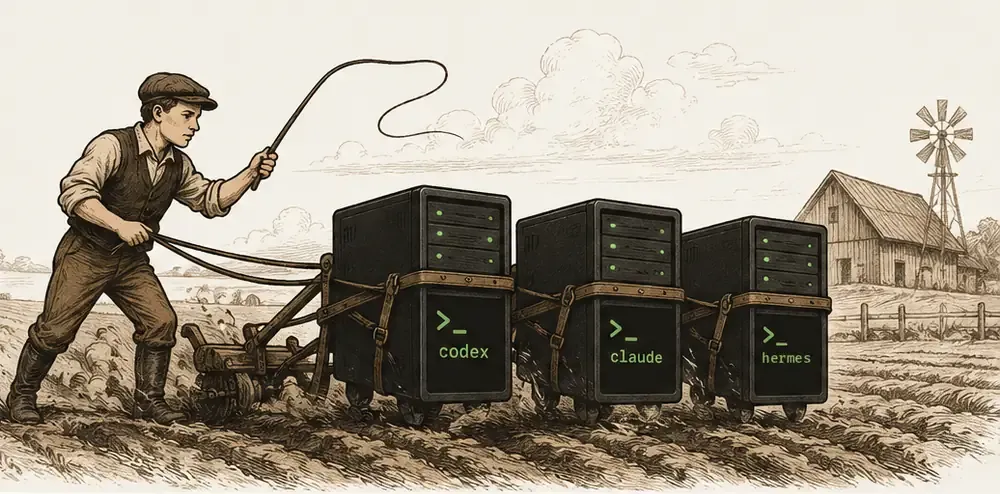
You run Claude Code in one terminal, Codex on the build box, another agent on the laptop. One of them has been waiting ten minutes for you to approve a command and you have no idea which. pohunek keeps every agent session alive in a durable terminal on its own machine and knows when one needs you. This widget puts all of it in the bar you already look at.
-
Needs you, first
Sessions blocked on an approval or a question sit on top of every view, from every host, oldest wait first. The bar icon turns amber and counts them. A desktop notification pops up; click it and you are in that session’s terminal.
-
Every machine, one list
This machine, your other Omarchy machines and any pohunek daemon on your NetBird or Tailscale network, side by side, each row with its host chip. A machine that drops off keeps its rows, dimmed.
-
A real terminal, one click away
Enter or a click attaches (
pohunek attach);Ctrl+]detaches and the agent keeps working. -
Your groups, everywhere
Groups live in the session’s
companion.groupmetadata, so they are the same groups the pohunek desktop and Android companions show. -
New sessions without the CLI
Pick a host, a project and an agent (with fuzzy search when the lists get long), write the first prompt,
Ctrl+Enter.
A tour
My groups
Needs you on top, then Inbox and your own groups. Each row: state, agent, project, Work link (GH PR #1412), branch, host.
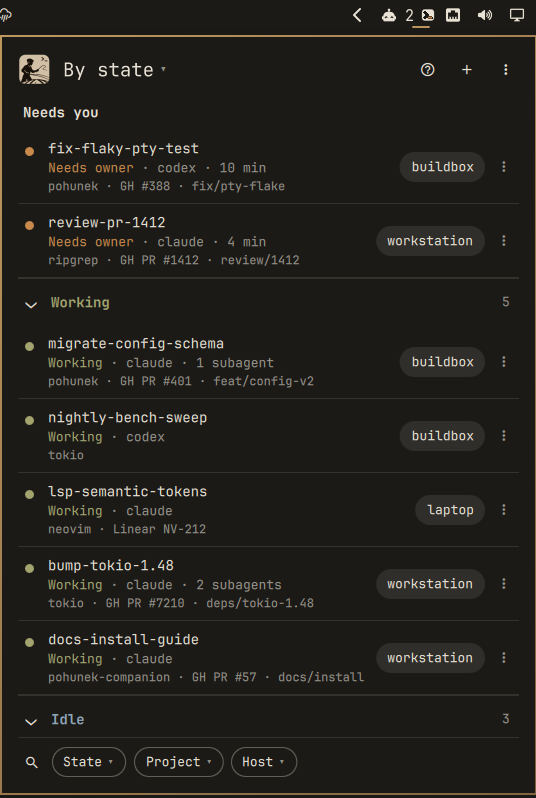
By state
Needs you, Working, Idle, Runtime problem. Ended sessions stay hidden until you pick them.
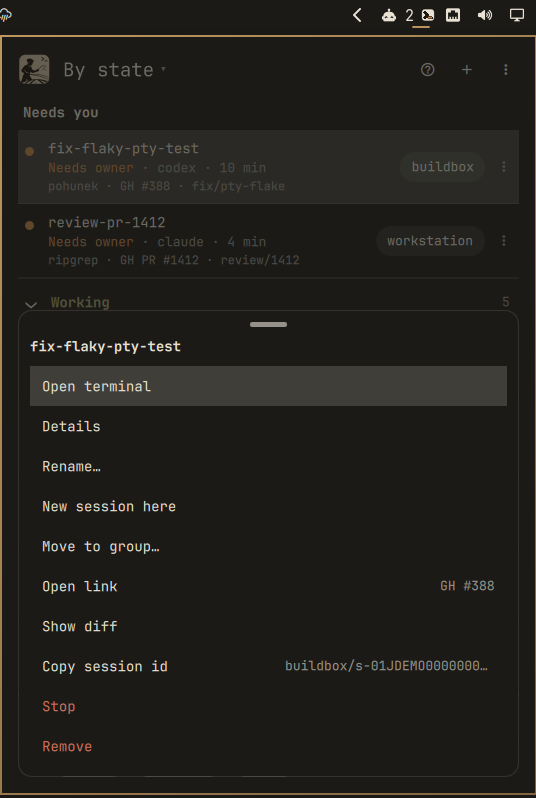
Actions
Open terminal, details, rename, new session here, move to group, open link, diff, stop, remove, resume. Reach them with the three-dot button, a right click or the right arrow key.
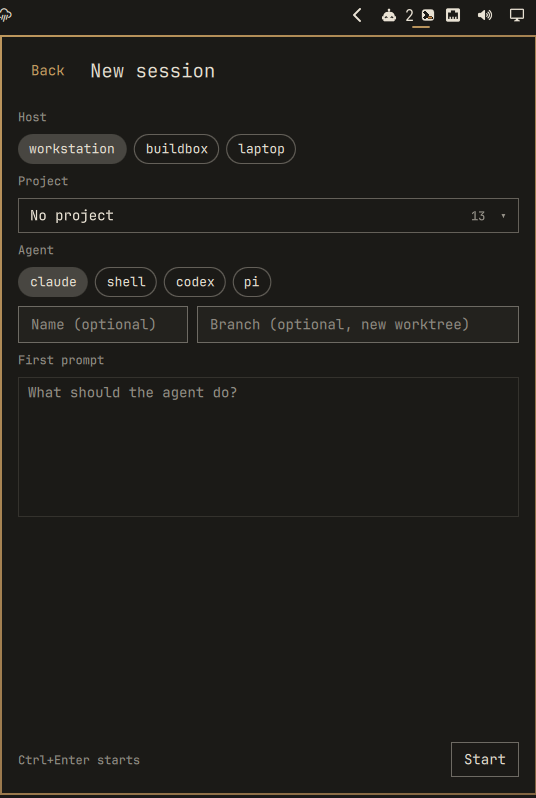
New session
Host, project, agent, name, branch (a fresh worktree), first prompt. Long lists turn into a fuzzy search select.
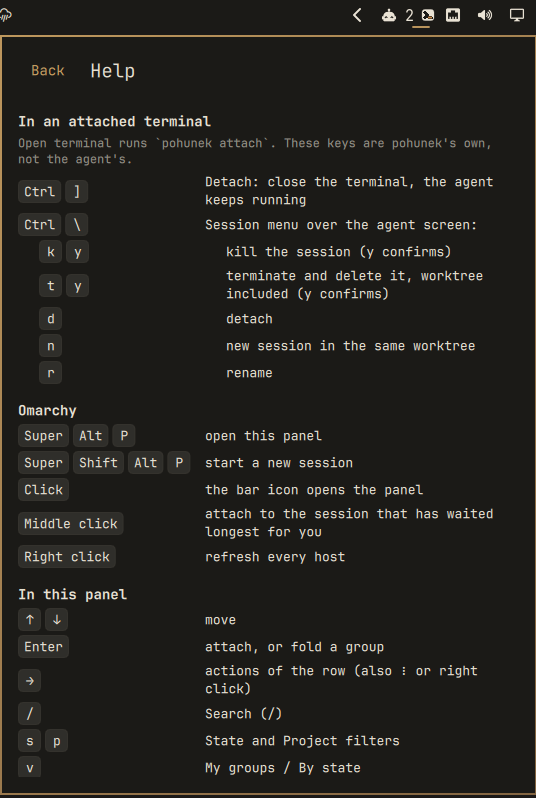
Help
Press ? for every key in the panel and, most importantly, the ones inside an attached terminal.
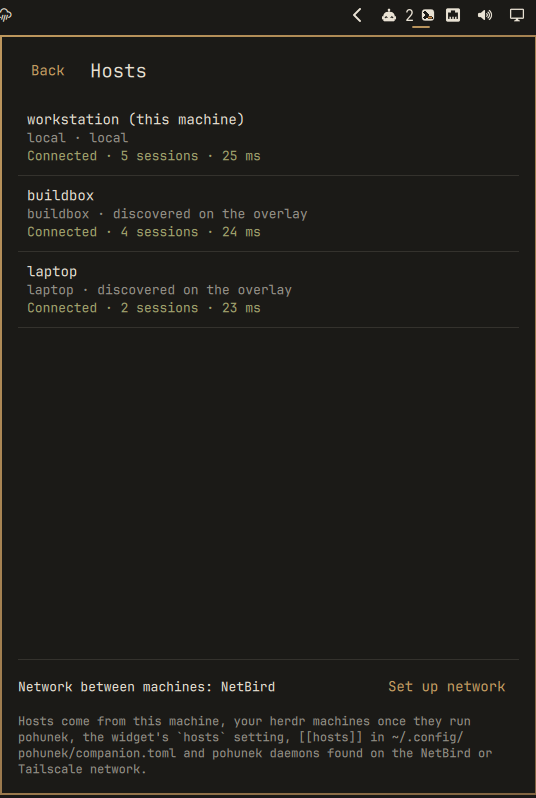
Hosts
Every pohunek daemon you can reach, the network that carries them, and your Omarchy machines that do not run pohunek yet.
Install
One command, then one click.
omarchy plugin add https://github.com/pohunekd/omarchy --enable
No pohunek on the machine yet? The panel offers Install pohunek: it fetches the latest release, verifies it, shows what will be written where, and asks once.

Pinned and verifiable
Users install from the default branch; each release also ships pohunek-omarchy-0.3.0-noarch.tar.gz with its .sha256, both carrying a GitHub build attestation, for pinned and manual installs.
gh release download v0.3.0 --repo pohunekd/omarchy --dir release
cd release
sha256sum -c pohunek-omarchy-0.3.0-noarch.tar.gz.sha256
gh attestation verify pohunek-omarchy-0.3.0-noarch.tar.gz --repo pohunekd/omarchy
gh attestation verify pohunek-omarchy-0.3.0-noarch.tar.gz.sha256 --repo pohunekd/omarchy
Release v0.3.0, 2026-11-10. Changelog in the repository.
Controls
Omarchy
| Keys | Does |
|---|---|
| SuperAltP | open the pohunek panel |
| SuperShiftAltP | start a new session |
Add both with one click: Help → Add these shortcuts to Hyprland, or run tools/add-shortcuts. It refuses keys that are already taken, backs up bindings.lua and checks Hyprland for config errors.
Inside an attached terminal
These are pohunek’s keys, not the agent’s. Most people never find them.
| Keys | Does |
|---|---|
| Ctrl] | detach: close the terminal, the agent keeps running |
| Ctrl\ | session menu over the agent screen |
| ky | in the menu: kill the session |
| ty | in the menu: terminate and delete it, worktree included |
| d | in the menu: detach |
| n | in the menu: new session in the same worktree |
| r | in the menu: rename |
In the panel
| Keys | Does |
|---|---|
| ↑↓ | move |
| Enter | attach, or fold a group |
| → | row actions |
| n | new session |
| ido | details, diff, open Work link |
| eg | rename, move to group |
| ? | help |
| / | search every host |
| sp | State / Project filter |
| v | My groups / By state |
| c | clear filters |
| H | hosts |
| r | refresh |
| Esc | back, close |
Everything works with the mouse as well.
Your machines: NetBird and Tailscale
pohunek has no server and no cloud. Each machine runs its own daemon, and the machines talk directly over your overlay network: NetBird (pohunek’s default) or Tailscale (built into Omarchy, with its own bar widget and Taildrop). Your agents never leave machines you own.
| Topic | NetBird | Tailscale |
|---|---|---|
| pohunek | default, nothing to configure | providers = ["tailscale"] in ~/.config/pohunek/overlays.toml |
| Omarchy | AUR netbird-bin | omarchy install service tailscale (+ bar widget, Taildrop) |
| Self-hosted | NetBird management server | Headscale |
| Join | netbird up --management-url … | sudo tailscale up |
Set it up in one go: Hosts → Set up network (or tools/setup-network) asks NetBird or Tailscale, installs the client, joins the network, writes overlays.toml and restarts the daemon. Live sessions keep running.
Hosts
New hosts show up by themselves.
The widget re-probes the network every ten minutes. A machine that drops off keeps its rows, dimmed, until it is back.

Roll it out to every machine. Omarchy keeps your machines in the herdr registry (herdr machine add). The Hosts page lists the ones that do not run pohunek yet, each with Install there, or from a terminal:
tools/distribute
tools/distribute laptop me@box
On each machine, over SSH, it copies your overlay choice, installs or updates this widget, and installs pohunek. Joining the network needs a login there, so it tells you where to run tools/setup-network.
Safe by design
The widget reads first and asks before it acts.
Reads first
The list comes from
pohunek session list --jsonandnotifications list --unread --json; nothing changes a session until you pick an action, and stop/remove ask first.Plain text only
Session names, prompts and notification text are untrusted: bounded, stripped of control and bidi characters, never rendered as markup.
No shell strings
Every command is an argv array. Only ids matching the pohunek session-id shape and validated SSH targets ever reach one; the notification click uses Omarchy’s
--exec, never a string.Verified installs
tools/install-pohunekchecks the release SHA-256 and, whenghis signed in, its GitHub build attestation, then hands over to the release’s own installer, which verifies its MANIFEST. Agent hooks are offered, never installed silently.